Your Microsoft Technology Development and Consulting Experts - Operating since 2000

Australia WideSydney, NSWMelbourne, VicBrisbane, QldPerth, WAAdelaide, SACanberra, ACTNorthern Rivers, NSWWollongong, NSWRichmond, VicDarwin, NT
Your Microsoft Technology Development and Consulting Experts - Operating since 2000


January 15, 2026
12 min read
You've been using Microsoft Access for years, and it's served you well. But now you're hitting limitations, or your IT department is pushing for change, maybe you're reading about the plethora of modern alternatives and wondering if its time to move on? Before you jump ship and invest thousands in a migration, let's take a deep dive into your options.
This article covers everything you need to know about Microsoft Access alternatives in 2026, including when Access is still the right choice, real alternatives with honest pros and cons, migration pathways that actually work, and how to make the best decision for your specific situation.
Sometimes the answer is to migrate away from Access. But just as often, the best solution is to modernise or optimise your existing Access database rather than replace it entirely.
Before we dive into alternatives, we need to address something important... Many of the "Access problems" businesses experience aren't actually Access problems at all. They're database design problems, configuration problems, or a fundamental misunderstanding of how to use Microsoft Access in 2026.
If your Access database crawls along like an old dial-up modem, the issue is most likely poor database design. Unindexed tables, inefficient queries, and bloated databases from years of accumulated data are the usual culprits.
Solution - Database optimisation can restore performance dramatically. We've seen databases that took 30 seconds to load a form reduced to under 2 seconds simply through proper indexing and query optimisation. Before committing to a migration, consider whether professional optimisation could solve the problem - it often can, at a fraction of the cost.
This one catches a lot of people out. Access is perfectly capable of handling 10–15 concurrent users with a proper front-end/back-end split and sensible network configuration. If you're hitting conflicts with fewer users than that, the problem is almost certainly your database architecture - not Access itself.
Solution - A SQL Server back-end with your existing Access front-end can support far greater numbers of concurrent users whilst keeping the interface your team already knows. This hybrid approach costs considerably less than a complete rebuild - and your staff won't need retraining.
True, you can't simply open an Access database over the internet like a web app - but this doesn't mean you need to rebuild everything from scratch. The most effective solution for most businesses is migrating the back-end data to Azure SQL in the cloud, whilst keeping your familiar Access front-end exactly as it is. Your data lives securely in the cloud; your staff continue using the same forms and reports they already know.
Azure Virtual Desktop and Terminal Server are also options worth knowing about - they can deliver excellent performance, especially when the database and virtual machine are hosted on the same Azure server. That said, they do carry ongoing running costs, so weigh them up against the Azure SQL approach before committing.
The big bonus? Once your data is in the cloud on Azure SQL, you're not locked into Access forever. You can layer on Power Apps, build web interfaces, create mobile apps, or connect to Power BI dashboards - all talking to the same database. It's a genuine modernisation pathway, not just a band-aid fix.
The interface might look dated, but Access 2021 and Microsoft 365 versions integrate beautifully with modern tools. You can connect Access to Power BI for stunning dashboards, Azure for cloud data storage, and SharePoint for collaboration.
Solution - Modern integration rather than replacement. Keep your robust database engine whilst adding contemporary reporting and collaboration features through Power BI integration.
"Despite declaring the removal of Access from Office 365, Microsoft quietly changed its mind. Updates continued to appear-the latest version of Access in Office 365 was released in September 2020, with continued support and integration improvements."
Honestly, the vast majority of businesses that come to us thinking they need to replace Access actually don't. What they need is a smarter way to run it. That might mean moving the back-end data to SQL Server, hosting it in the cloud, or adding modern reporting through Power BI. None of that means throwing away the Access front-end your team has used for years.
That said, there are genuine situations where Access truly isn't the right tool anymore...
Symptoms:
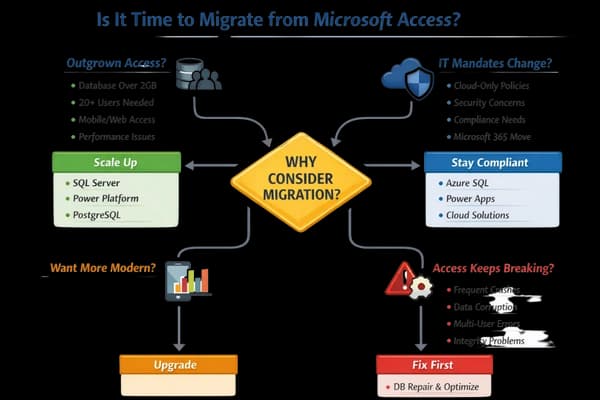
Best Starting Point: Azure SQL (cloud) or SQL Server (on-premises) as the back-end, keeping your Access front-end. This resolves most "outgrown" issues without a full rebuild. From there, you can progressively add web interfaces or Power Apps if and when you need them.
Symptoms:
Best Alternatives: Azure SQL Database, Power Apps with Dataverse, or cloud-hosted Access as an interim solution.
Symptoms:
Best Alternatives: Power Platform, modern web applications, or Access with Power BI integration for reporting.
Symptoms:
Reality Check: This is almost always a setup or design problem, not an Access problem. Before migrating, consider professional database repair and optimisation.
Recommended First Step: A professional database assessment to identify the root cause before committing to migration. This upfront investment frequently prevents far more costly decisions down the track.
"One of the key disadvantages of Microsoft Access is its limited data size. It has a maximum file size limit of 2 Gigabytes (GB) for a single file. This size constraint can pose challenges when dealing with large datasets that exceed the storage capacity."

This is the most popular modernisation path for Australian businesses, and for good reason. You move your data to SQL Server (on-premises or Azure SQL in the cloud) whilst keeping your existing Access forms and reports exactly as they are. You and your staff will notice that things run better and smoother, but your front end can remain identical.
Once your data is on Azure SQL, you also unlock a whole ecosystem of modern capabilities. Power Apps for web or mobile access, Power BI for real-time dashboards, and custom web interfaces that connect directly to the same database. You don't have to use any of these immediately, but now the option is there when you need it.
| Aspect | Details |
|---|---|
| Migration Complexity | Medium to High |
| User Retraining | Minimal (if keeping Access frontend) |
| Ongoing Costs | SQL Server licensing or Azure subscription |
Learn more about SQL Server migration →

Microsoft's modern low-code platform designed as the "future" of Access. Power Apps provides web and mobile interfaces, whilst Dataverse handles data storage in the cloud.
| Aspect | Details |
|---|---|
| Migration Complexity | Medium to High |
| User Retraining | Significant (new interface) |
| Ongoing Costs | Per-user Microsoft licensing (check current Microsoft pricing) |
"According to Adrian Bradley, head of cloud at consultancy firm KPMG, cloud take-up among enterprises is growing at 25% to 30% globally. On-premise technology spending is rising more slowly, at 17-20%. Over time, an ever-higher percentage of workloads will be in the cloud."
Power Platform makes most sense when you already have Microsoft 365 E3 or E5 licenses (which include Power Apps), mobile access is critical, business logic is simple to moderate, and you want Microsoft's support and ecosystem integration.
Learn about Power Platform with Access →

A complete rebuild using modern web technologies provides maximum flexibility and control but requires significant investment.
| Aspect | Details |
|---|---|
| Migration Complexity | High |
| User Retraining | Extensive |
| Ongoing Costs | Hosting + maintenance (varies by infrastructure) |

Cloud-based database platforms provide quick setup and modern interfaces without coding, though they may lack the power and customisation of other options.
| Platform | Pricing Model | Best For |
|---|---|---|
| Airtable | Subscription per user/month | Visual project management |
| Knack | Subscription per plan tier | Custom business apps |
| Caspio | Subscription per plan tier | Workflow applications |
| QuickBase | Custom pricing | Enterprise solutions |
Pricing changes frequently - always check each platform's website for current AUD rates before making a decision.
SaaS platforms work well when your needs are straightforward, you want to get up and running quickly, you don't have complex business logic, AND you're comfortable with subscription pricing. They're less suitable for complex workflows, sensitive data requiring on-premises storage, or highly customised business processes.
"At first glance, Airtable's paid plans appear straightforward-choose a pricing plan, add your users, and start building. Yet behind the clear tiers lie record caps, automation limits, and integration costs that can make scaling expensive."
- Baserow

For budget-conscious small businesses and organisations, or simply those wanting complete control, open-source alternatives can provide some powerful capabilities without the licensing costs.
Open-source solutions work best when you have IT expertise in-house, want to avoid vendor lock-in, need complete data control, or have budget constraints preventing commercial alternatives.
The Problem - Rushing into migration without proper planning leads to scope creep, cost overruns, and failed projects.
The Solution: Invest in a professional database assessment first. This upfront investment prevents expensive mistakes, provides a clear roadmap, and often reveals that migration isn't necessary at all.
The Problem: A technically successful migration becomes a business failure if users can't or won't use the new system.
The Solution: Budget 10-20 hours of training per user for significant interface changes. Include training costs in your migration budget from day one.
The Problem: Migrating poor-quality data to a new system doesn't fix the underlying problems... It just moves them to a more expensive platform!
The Solution: Clean your data before migration. Address duplicate records, inconsistent formatting, and missing information in your current Access database first.
The Problem: Selecting a solution because it's "modern" or "trendy" rather than because it fits your actual business requirements.
The Solution: Start with business requirements, then evaluate technologies. The newest platform isn't always the right platform.
The Problem: That "simple" Access database actually contains years of accumulated business logic, custom calculations, and special cases that aren't documented anywhere except in the developer's head (who left three years ago).
The Solution: Add 30-50% buffer to initial cost and time estimates. Complex business logic takes longer to rebuild than it seems.

Answer these questions honestly...
Stay with Access (optimise or modernise the back-end) if...
Consider a broader platform change if...
| Your Situation | Best Alternative | Why |
|---|---|---|
| Need more capacity, keep interface | SQL Server + Access Frontend | Minimal disruption, proven solution |
| Need mobile/web, Microsoft 365 users | Power Platform | Native integration, modern interface |
| Unique requirements, big budget | Custom Web Application | Maximum flexibility and control |
| Simple needs, small team | SaaS Platform (Airtable, etc.) | Quick setup, low barrier to entry |
| Budget constrained, IT expertise | Open-Source Solution | No licensing costs, full control |
Microsoft Access isn't dead, but it's not always running the way it should. The "best" alternative depends entirely on your specific business needs, budget, timeline, technical expertise, and long-term goals.
For most businesses, the answer isn't to replace Access - it's to modernise it. Moving your data to a SQL Server back-end (whether hosted on your own infrastructure or in Azure) often costs far less than a full migration, and your team keeps the interface they already know. From there, the door is open to add web interfaces, Power Apps, mobile access, and more - all on your own timeline.
When migration genuinely is the right answer, we'll tell you honestly. But we've found that most people simply need a professional eye on the problem - and a clear, practical path forward.
After 25+ years specialising in Access databases across Australia, we've learned that the best migration is sometimes no migration at all. Other times, it's a complete rebuild. The key is making an informed decision based on your specific situation - not industry hype or vendor pressure.
Daniel is a developer at the Office Experts Group, a curious mind into the world of programming, design and SEO. If you have any questions, please feel free to get in contact via the form below.

Copyright © 2024. Brayalei Pty Ltd T/As Office Experts Group. ABN 32 093 067 737. ACN 093 067 737. All Rights Reserved.
 consult@officeexperts.com.au
 1300 102 810